SSL証明書期限切れエラーで顔面がブルーレイコンプリートBOX
新サイトをオープンして、次々と発生するバグをもぐらたたきのように潰す毎日もようやく落ち着いてきたかなといった頃
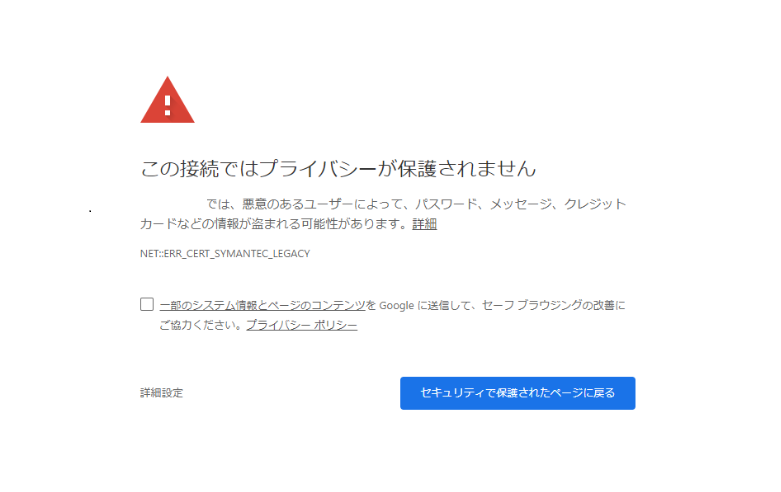
今度はセキュリティ警告画面が!
ぐえー
SSL証明書の期限が切れてるとこうなるようだが、これは一体全体どういうことなのか
自動更新だと思ってたからさー
僕が使ってるレンタルサーバー「Conoha VPS」はLetsEncryptというSSL証明書が無料で利用できます
ただ自動更新だと思ってたので、特に更新とか必要ないと思ってたんですよ
確かにメールは来てた
たしかにですね、「Let’s Encrypt Expiry Bot」という件名のメールは来てたんですよ
Hello,
Your certificate (or certificates) for the names listed below will expire in 20 days (on 11 Jul 20 00:11 +0000). Please make sure to renew your certificate before then, or visitors to your website will encounter errors.
We recommend renewing certificates automatically when they have a third of their
total lifetime left. For Let’s Encrypt’s current 90-day certificates, that means
renewing 30 days before expiration. See
https://letsencrypt.org/docs/integration-guide/ for details.
For any questions or support, please visit https://community.letsencrypt.org/. Unfortunately, we can’t provide support by email.
For details about when we send these emails, please visit https://letsencrypt.org/docs/expiration-emails/. In particular, note that this reminder email is still sent if you’ve obtained a slightly different certificate by adding or removing names. If you’ve replaced this certificate with a newer one that covers more or fewer names than the list above, you may be able to ignore this message.
If you are receiving this email in error, unsubscribe at
Regards,
The Let’s Encrypt Team
メールは来てたし読みましたけれども、先にも言いましたとおり、自動更新だと思ってたんで、ダイナマイト・完全・スルーしてたんですよ
「自動更新っすよw何言ってんすかw」くらいの斜め上で
したら何か言ってたのはむしろ自分の方で、こうして顔面がブルーレイコンプリートBOX完全版になる自体に陥ってしまったというわけなのです
certbot renewでいけるってよ
セキュリティ警告画面になっているのは事実なので、急いで対応しなければなりません
ゴーグルで調べたところピンピロ!
conohaVPSで同じくSSL証明書が期限切れになったTipsがヒットしました
ありがてぇ、ありがてぇ
先進の賢者のTipsによると、certbot renewというコマンド一発で解決できるそうだ
certbot renew
ソイ、、、
ジョイ!!
certbot入ってない!
なんと僕のサーバーにcertbotというコマンドは入っていないという!
certbot入れた
ぅああああああああ!yum でcertbotを入れた!
何かエラー
ズラズラズラとエラーが!
そんな場合じゃないですが、神様は僕に試練を与え給うた
DocumentRootのwell-known下のファイルがNotFound
苦しみ悶えながらエラーメッセージを読むと、どうやらドキュメントルート下の.well-knownディレクトリにアクセスをしようとして、404になっているようだ
以下エラー?
Domain:
Type: unauthorized
Detail: Invalid response from /.well-known/acme-challenge/:”\r\n404 Not Found\r\n\r\n
404 Not Found
To fix these errors, please make sure that your domain name was entered correctly and the DNS A/AAAA record(s)for that domain contain(s) the right IP address.
404:DEBUG:certbot._internal.error_handler:Encountered exception:
Traceback (most recent call last):
File “python2.7/site-packages/certbot/_internal/auth_handler.py”, line 91, in h andle_authorizations
self._poll_authorizations(authzrs, max_retries, best_effort)
File “/site-packages/certbot/_internal/auth_handler.py”, line 180, in _poll_authorizations
raise errors.AuthorizationError(‘Some challenges have failed.’)
AuthorizationError: Some challenges have failed.
:DEBUG:acme.client:Storing nonce:
:INFO:certbot._internal.auth_handler:Performing the following challenges:
:INFO:certbot._internal.auth_handler:http-01 challenge for
:INFO:certbot._internal.plugins.webroot:Using the webroot path /home/kusanagi//DocumentRoot for all unmatched domains.
:DEBUG:certbot._internal.plugins.webroot:Creating root challenges validation dir at /DocumentRoot/.well-known/acme-challenge
:DEBUG:certbot._internal.plugins.webroot:Attempting to save validation to /home/kusanagi/DocumentRoot/.well-known/acme-challenge/
:INFO:certbot._internal.auth_handler:Waiting for verification…
:DEBUG:acme.client:JWS payload:
:DEBUG:acme.client:Sending POST request to https://acme-v02.api.letsencrypt.org/acme/cha ll-v3/5836268844/IIPBeA:
それでも気になる現象
SSL証明書の更新に失敗するのは新しくオープンしたサイトだけで、その他のブログはちゃんと更新できている
なんだろう、何してるのこの人?
DocumentRoot勝手に変えてました
僕がConohaVPSで契約してるのはWordpressがめたくそ高速になるKusanagiバージョンです

そのWordpress仕様のサーバーを、Laravel使いたいからって無理やり仕様変えて使ってたのは僕でした
ドキュメントルートも勝手に変更したので、旧ドキュメントルート配下の.well-known見に行こうとすればそりやまあNotoFoundになりますわなあ
/etc/letsencrypt/renewal/ドメイン.conf
のドキュメントルートらしきところをwebサーバーのドキュメントルートに合わせて修正
これでいいはず!
too many failed authorizations recentlyエラー
今度はまた何かエラー
神様、何してるのこの人
1時間に5回までだそうです
LetsEncryptの証明書更新リクエストは1時間に5回までだそうです
それ以上の頻度でリクエストするとtoo many failed authorizations recentlyエラーになります
エラーメッセージ読まず「あれ?あれ?」と僕みたいに不毛なリクエストを繰り返してるとあっさり上限超えます
時間をおいて再実行
ギリギリしながら待つこと1時間
再びSSL証明書更新リクエストを実行
今度は無事にSSL証明書が更新されました!
長かった!けどよかった!
ちなみにcertbotは不要
よく調べずにぅおおおおおとcertbotインストールしましたが、ConohaVPSのKusanagiバージョンでは以下のコマンドで更新できます
kusanagi update cert kusanagi
ダメージは深刻
エラーが起きてから直すまで丸1日かかりましたが、すなわちそれはあの警告画面が1日表示されていたということです
アクセス解析見ると、やはりというか案の定、新サイトのアクセスはゼロでした
まああんな警告画面が出てたら誰もそこから先を見に行こうと思わないですよね
うっかりでは済まされない、SSL証明書のエラーはダメージもLサイズなので、管理者の皆様お気をつけ下さいませね!
最初はConohaさんのせいにしてたけど、結局案の定とどのつまりは自分のせいでした
そんなわけで、Conohaサーバーは悪くない、むしろConohaは、いいぞ
今ならドメインが最大11個無料!!

1個でいいっつったって最大11個無料!!

コメント